This is an email I wrote to a group at the office explaining 120Hz with respect to HD TV sets. (Keep in mind this is written for an American audience, so I used the NTSC standard 30fps (60 fields/second). European countries have a different electrical system which operates at 50Hz thus there television standards (SECAM, PAL) were defined as 25fps (50 fields/second)
-----
There is a lot of incorrect information out there about 120Hz. There are two separate technologies and problems being solved, however, most sales people cannot separate them.
So first let us define the problems
1. Judder - This is when the image appears to stutter on sweeping camera moves or similar. Judder occurs because of a difference between the refresh rate of the display device and the frame rate of the source.
2. Motion Blur - This is an artifact of the fact that all video/film is moving pictures (e.g. sampled). The blur occurs because our eyes bridge the gap between frames.
Below we will define the two technologies which are unfortunately both referred to as 120Hz by most people
1. 120Hz - this is the refresh rate of the monitor, so how many full frames/fields per second which can be displayed. (Most devices have historically had 60Hz refresh)
2. Auto-Motion Plus (Samsung's TM, Sony named theirs MotionFlow) - This is an interpolation technique which attempts to create intermediate frames to increase the clarity and decrease the bridging your eyes need to do.
Now we know the two technologies and problems we are trying to solve.
The 120Hz (refresh rate alone) is designed to solve judder. To explain why this is we need to learn a little about video/film. As you may know film is recorded at 24 fps (frames per second), TV programing is filmed in 30 fps (60 Hz interlaced). So with a 60 Hz display we get a none equal pattern to display film (24 fps) with 60 Hz we get a 3:2 pattern so the first frame is displayed 3 times, then the second twice and that continues to fill out 24 fps into 60 fields/second, this is where the judder comes in as there is a caddence mismatch between the original film and the display. To correct this we look to 120Hz and the display rate becomes 5:5 each frame is displayed 5 times thus creating a standard cadence (however, the 3:2 cadence is hard coded into standard DVD video so you need to rely on a good de-interlacer to restore the original 24fps and then pass them at that rate to the TV so that we get 5:5 output.
The Auto-Motion (interpolation) changes the original quality of the video because it is adding frames that didn't originally exist. Some people like the extreme crispness of the image it produces. I prefer to see the directors intent and very much dislike the video which is produced by this interpolation.
So for me 120Hz would be a big buying point today, however, I would need to be able to ensure that the interpolation is off. For a normal consumer I would say it isn't a make or break feature.
Whew that was a lot of typing to let you know that I doubt it would matter to you or your family, however, hopefully it has educated and my assist others in deciding.
Friday, December 26, 2008

Sunday, December 14, 2008
Friday, October 03, 2008
Video Encoding with mencoder is a nightmare
I have been spending a lot of time recently working on defining exactly how to accomplish taking my HD feed of television programing, and automatically encoding it to remove commercials and use x264 as the H264 encoding engine. To this end I have found some lacking in the original mencoder documentation. I will try to document each of the filters that I am using in my attempt to complete my task and hopefully help others to not have the same issue(s).
Conventions:
Text which requires replacement will be marked like a variable with a dollar sign ($).
definitions will be preceded by a double hyphen (--)
Part 1. In this section I will provide an automated method to crop a video to remove all of the black bar area. The remaining video area will be the correct aspect ratio...etc. as mencoder corrects this for us.
Step 1 is to get the crop value. The easiest method is to use mencoders brother mplayer and the cropdetect filter
mplayer -vf cropdetect $videofile
cropdetect -- outputs to console the current crop values to remove the black area around an image as mplayer plays. output will be similar to [CROP] Crop area: X: 0..1738 Y: 0..1079 (-vf crop=1728:1072:6:4). (units pixel)
Now you can just copy paste the -vf crop line and run mencoder with the crop filter.
crop=w:h:x:y -- crops a video frame to w by h and offsets the frame by x:y from the top left corner. Keep in mind you must be re-encoding the video otherwise crop is meaningless. (units pixel) Crop can be used in both mencoder and mplayer...so you can test the crop values by doing
mplayer -vf crop=$cropvalues and see how the frame will look.
and of course to encode
mencoder $infile -vf crop=$cropvalues -ovc $video_codec -oac $audio_codec -of $output_formatdefaultavi -o $outfile
Step 2 Now how do we string these two items together? cropdetect and crop?
Answer: Scripting, woo.
As I am using windows and my HTPC is windows I am writing my scripts in batch but, you should easily be able to convert to perl/bash...etc.
1. Let's get the crop detected values into a text file that we can find within (this is far easier with GNU tools such as grep than Windows find. But here is the line I use
mplayer -vf cropdetect -ao null -vo null -frames 5 $infile | find "-vf crop=" > crop
This parses 5 lines of the video, and find selects only the lines with crop them to print to the text file 'crop'. Next we need to extract the crop parameter
2. Extract the detected values
FOR /F "tokens=3 delims=(=)" %%G IN ('type "crop"') DO SET crop=%%G
What this line does is, for each line in the crop file extract separate items based upon the delims ((=)) and take the third item (tokens=3) then I set that item to crop
[CROP] Crop area: X: 0..1738 Y: 0..1079 (-vf crop=1728:1072:6:4). is broken into
1=[CROP] Crop area: X: 0..1738 Y: 0..1079
2=-vf crop=
3=1728:1072:6:4
3. use the crop values in your mencoder filter string
mencoder $infile -vf crop=$cropvalues -ovc $video_codec -oac $audio_codec -of $output_formatdefaultavi -o $outfile
Let's put it together
-----
mplayer -vf cropdetect -ao null -vo null -frames 5 $infile | find "-vf crop=" > crop
FOR /F "tokens=3 delims=(=)" %%G IN ('type "crop"') DO SET crop=%%G
--mplayer is a little weird and will sometimes take over the stdout redirection. Here is my replacement way to do this
FOR /F "tokens=3 delims=(=)" %%G IN ('mplayer -vf cropdetect -ao null -vo null -frames 5 $infile') DO SET crop=%%G
mencoder $infile -vf crop=%crop% -ovc $video_codec -oac $audio_codec -of $output_formatdefaultavi -o $outfile
-----
Conventions:
Text which requires replacement will be marked like a variable with a dollar sign ($).
definitions will be preceded by a double hyphen (--)
Part 1. In this section I will provide an automated method to crop a video to remove all of the black bar area. The remaining video area will be the correct aspect ratio...etc. as mencoder corrects this for us.
Step 1 is to get the crop value. The easiest method is to use mencoders brother mplayer and the cropdetect filter
mplayer -vf cropdetect $videofile
cropdetect -- outputs to console the current crop values to remove the black area around an image as mplayer plays. output will be similar to [CROP] Crop area: X: 0..1738 Y: 0..1079 (-vf crop=1728:1072:6:4). (units pixel)
Now you can just copy paste the -vf crop line and run mencoder with the crop filter.
crop=w:h:x:y -- crops a video frame to w by h and offsets the frame by x:y from the top left corner. Keep in mind you must be re-encoding the video otherwise crop is meaningless. (units pixel) Crop can be used in both mencoder and mplayer...so you can test the crop values by doing
mplayer -vf crop=$cropvalues and see how the frame will look.
and of course to encode
mencoder $infile -vf crop=$cropvalues -ovc $video_codec -oac $audio_codec -of $output_formatdefaultavi -o $outfile
Step 2 Now how do we string these two items together? cropdetect and crop?
Answer: Scripting, woo.
As I am using windows and my HTPC is windows I am writing my scripts in batch but, you should easily be able to convert to perl/bash...etc.
1. Let's get the crop detected values into a text file that we can find within (this is far easier with GNU tools such as grep than Windows find. But here is the line I use
mplayer -vf cropdetect -ao null -vo null -frames 5 $infile | find "-vf crop=" > crop
This parses 5 lines of the video, and find selects only the lines with crop them to print to the text file 'crop'. Next we need to extract the crop parameter
2. Extract the detected values
FOR /F "tokens=3 delims=(=)" %%G IN ('type "crop"') DO SET crop=%%G
What this line does is, for each line in the crop file extract separate items based upon the delims ((=)) and take the third item (tokens=3) then I set that item to crop
[CROP] Crop area: X: 0..1738 Y: 0..1079 (-vf crop=1728:1072:6:4). is broken into
1=[CROP] Crop area: X: 0..1738 Y: 0..1079
2=-vf crop=
3=1728:1072:6:4
3. use the crop values in your mencoder filter string
mencoder $infile -vf crop=$cropvalues -ovc $video_codec -oac $audio_codec -of $output_formatdefaultavi -o $outfile
Let's put it together
-----
mplayer -vf cropdetect -ao null -vo null -frames 5 $infile | find "-vf crop=" > crop
FOR /F "tokens=3 delims=(=)" %%G IN ('type "crop"') DO SET crop=%%G
--mplayer is a little weird and will sometimes take over the stdout redirection. Here is my replacement way to do this
FOR /F "tokens=3 delims=(=)" %%G IN ('mplayer -vf cropdetect -ao null -vo null -frames 5 $infile') DO SET crop=%%G
mencoder $infile -vf crop=%crop% -ovc $video_codec -oac $audio_codec -of $output_formatdefaultavi -o $outfile
-----
Sunday, June 22, 2008
Best HTPC Front-end
I have been having a lot of fun lately with building my new HTPC. It is based upon my old Gaming Rig, ASUS M2N-SLI Deluxe w/ AMD Athlon XP 3500+ (64-bit) w/ 2GB RAM and a EVGA Geforce 7900. I added a Hauppauge HVR-1800 for TV tuning, it supports NTSC, ATSC, and clearQAM tuning. I put all of this into a new case, a Coolermaster CM-282 which has a built on front panel LCD and Remote Control by SoundGraph.
With the Soundgraph LCD and Remote you get the Soundgraph iMon/iMedian software, iMon provides controls for the Front Panel and Remote, iMedian is Soundgraph's HTPC front-end, and it isn't horrible...but it isn't complete and the performance is not what you would really want. My biggest issue with the iMedian software is that as I delete/add files to my Hard Drive I would need to rescan to update the database. And the scanning is beyond slow for iMedian. So I began looking for alternatives, SageTV, BeyondTV, Meedio (now Yahoo Media Center or something like that)...etc. I found a lot of these did some things better than iMedian, however, overall they were not what I wanted.
Finally I came upon a free HTPC Front End software by a guy from New Zealand, the software is named GBPVR. It not only does everything as well/better than iMedian, it also has a built in TV Tuner that is very feature rich, with built in Electronic Programming Guide (EPG). Now GBPVR still has its issues, however, the developer of the product is extremely willing to help and fix issues. I filed (well opened a support thread on) a bug with DVD Special Features and he had a test fix for me within a few weeks. The issue was that some Special Features are in 4:3 frames and the software was not getting that data and rebuilding the frame, so the video was being stretched. Anways, he fixed that very quickly and he seemed eager to improve his product. For this I gave him $10 USD. As a retail product I would have to pay far more for this but, it is just a donation. Also, remember my main complaint from iMedian, having to rescan all the time, well GBPVR seems to not use a static db but, rather reads the current directory structure. So no phantom files or missing files.
If you, like me, are looking for a good HTPC front-end, I would highly recommend you look at GBPVR.
With the Soundgraph LCD and Remote you get the Soundgraph iMon/iMedian software, iMon provides controls for the Front Panel and Remote, iMedian is Soundgraph's HTPC front-end, and it isn't horrible...but it isn't complete and the performance is not what you would really want. My biggest issue with the iMedian software is that as I delete/add files to my Hard Drive I would need to rescan to update the database. And the scanning is beyond slow for iMedian. So I began looking for alternatives, SageTV, BeyondTV, Meedio (now Yahoo Media Center or something like that)...etc. I found a lot of these did some things better than iMedian, however, overall they were not what I wanted.
Finally I came upon a free HTPC Front End software by a guy from New Zealand, the software is named GBPVR. It not only does everything as well/better than iMedian, it also has a built in TV Tuner that is very feature rich, with built in Electronic Programming Guide (EPG). Now GBPVR still has its issues, however, the developer of the product is extremely willing to help and fix issues. I filed (well opened a support thread on) a bug with DVD Special Features and he had a test fix for me within a few weeks. The issue was that some Special Features are in 4:3 frames and the software was not getting that data and rebuilding the frame, so the video was being stretched. Anways, he fixed that very quickly and he seemed eager to improve his product. For this I gave him $10 USD. As a retail product I would have to pay far more for this but, it is just a donation. Also, remember my main complaint from iMedian, having to rescan all the time, well GBPVR seems to not use a static db but, rather reads the current directory structure. So no phantom files or missing files.
If you, like me, are looking for a good HTPC front-end, I would highly recommend you look at GBPVR.
Sunday, November 11, 2007
Keith Lorentzen Memorial Slideshow
Hello Everyone,
Many people wanted a copy of this, so here it is. Please head on over tohttp://lorentzen.x10hosting.com site no longer operational to get a copy of it, either the Powerpoint Slideshow or Powerpoint both are the same size(5.6 MB).
Many people wanted a copy of this, so here it is. Please head on over to
Wednesday, November 07, 2007
Update for the regular listeners
If you know me personally you may have already heard about my brother's death. Keith Wendell Lorentzen died on Sunday (11/4/07). The remaining Lorentzen Family is in Connecticut now preparing for the funeral...etc.
You can get more information at worldkarting.com (http://www.worldkarting.com/pg/news/2007-11/KeithLorentzen.html)
I thank everyone for their outpouring of support.
You can get more information at worldkarting.com (http://www.worldkarting.com/pg/news/2007-11/KeithLorentzen.html)
I thank everyone for their outpouring of support.
Tuesday, October 02, 2007
Good Morning

Well, didn't get up until 0720 this morning...was deep in contemplative sleep or just being lazy, take your pick :). Just wanted to welcome the day with a nice sunrise, and remember "You've got to make your own type of music, play your own special song" Mama Cass - Make Your Own Kind Of Music :). Have a good day everyone.
Saturday, June 30, 2007
The Rensselaer Magizine recognizes Stickymap.com
The recent issue of the Rensselaer Magazine (Spring 2007) speaks of my activities with the website http://www.stickymap.com.
And I quote:
"Craig Lorentzen has been part of a team of three that developed Stickymap.com, an interactive Web site that lets users annotate maps of neighborhoods throughout the country."
This has been an interesting project which I worked with Max Sklar and Daniel Wiznia (Yale Grads 2006) to get it off the ground. At this point I play a far reduced part in the project. Max has become a budding Website developer he has spent tons of time learning AJAX, CSS, HTML...etc. And Dan is providing direction and business like activities.
Please check out the site and the development blog http://blog.stickymap.com/.
And I quote:
"Craig Lorentzen has been part of a team of three that developed Stickymap.com, an interactive Web site that lets users annotate maps of neighborhoods throughout the country."
This has been an interesting project which I worked with Max Sklar and Daniel Wiznia (Yale Grads 2006) to get it off the ground. At this point I play a far reduced part in the project. Max has become a budding Website developer he has spent tons of time learning AJAX, CSS, HTML...etc. And Dan is providing direction and business like activities.
Please check out the site and the development blog http://blog.stickymap.com/.
Wednesday, October 04, 2006
Tiumphant Return
I hope to be updating you, my readers, more often.
Anyways as those who know me outside the web should know. I am working at Cisco Systems in RTP North Carolina. Stickmaps Marker
I have an apartment but I spend far more time at work than in the apartment, I know "welcome to the real world." Anyways, I am having fun with friends at work and outside of work. Been doing a good amount of Mountain Biking. http://www.trianglemtb.com/
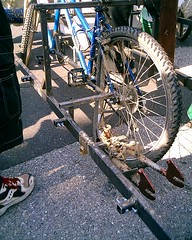
I need to get a new bike unfortunately, I taco-ed the rear tire recently.

The look of a taco-ed tire.
Anyways as those who know me outside the web should know. I am working at Cisco Systems in RTP North Carolina. Stickmaps Marker
I have an apartment but I spend far more time at work than in the apartment, I know "welcome to the real world." Anyways, I am having fun with friends at work and outside of work. Been doing a good amount of Mountain Biking. http://www.trianglemtb.com/
I need to get a new bike unfortunately, I taco-ed the rear tire recently.
Sunday, April 23, 2006
Arguably the best weekend ever
This weekend was great. I spent Friday night in
Got home around 4AM and hit the sack to sleep like a log until 2PM Saturday. Got down to work started and completed my final paper for Philosophy of Law class. Then went and enjoyed a night of musical expression performed by my roommate’s band…Tryptich. I think everyone enjoyed the show.
Finally a relaxing Sunday to top of the best weekend I have ever had here at RPI.
Thursday, March 30, 2006
How to fold a Shirt
The Japanese Way.

Pretty cool, seems to be easier than normal folding after a couple tries.
Rant
Why would you open a new product when the same exact thing is already open, and perfectly good?!?!?!?!??
Saturday, February 25, 2006
Trusted Computing
This is a great little animation on what Trusted Computing was supposed to be, and what it has become.
http://www.lafkon.net/tc/
http://www.lafkon.net/tc/
Saturday, February 04, 2006
Nintendo Old-School Revolution

They killed his brother. Now Nintendos Old School characters must teach the Next-Gen crowd a lesson. "Open War Is Upon Us."
Tuesday, January 17, 2006
Worst Clips 2002 - 2004 (2006)
"Bad" TV
 From the people who take it upon themselves to "clean" up TV. Compiled by the Parents Television Council, here is the worst of TV that you shouldn't watch. But here it is for your enjoyment.
Anyone find it moronic to compile what people shouldn't watch when you are the ones telling them they shouldn't watch it?
BTW: First post of the New Year, YAY!!
Wednesday, December 14, 2005
Ice on the window
Well I came back from my Computer Graphics Final today, enjoyed and episode of Babylon 5, then went to the kitchen to prepare a meal. Found the kitchen sink nonfunctional, boo have to call RPIRentals on that grr. Anyways I went to the bathroom to check if any water was working, sure enough the bathroom faucet gave me both hot and cold water.
Out of the corner of my eye I glimpse Ice on the inside of the bathroom window. I wonder, "what the f#@*?," well I decided to investigate.
I begin to investigate, first to remove our ghetto paper curtain. Still need to get on RPIRentals for those, anyways. I remove it and find parts of curtain stuck to the bottom of the window sill, they are frozen to the sill. There got it removed, I can now see the lower window, and the light sheen of ice coating the majority of it, as well I notice the external storm window is up with the screen down...ARGG I've got to get that storm window down and stop the ice formations, however pretty they might be.
Let's see tools? Hammer and Flat Head Screw drivers...perfect. (Chip, Chip, Chip, Bang, Bang, Bang) How the heck is Robare still sleeping through this? Oh well, an hour passes, well got most of the ice. Pull, strain, ahh the metal clips are stuck. (Chip, Chip, Chip, Bang, Bang, Bang), there they seem free now. Pull, strain, ahh the metal still stuck. (Pry, Pry, Pry, Bang, Pry) One sides up. Now the other, Yes got it.
After an hour and a half the window acquiesces and opens. Brr it's cold outside, put up the screen no trouble, put down the storm window yes both work. Now to put down the inner window. Good, looking down, my feet are covering in melting ice and paint chips, grr. Whisper that I hate RPIRentals, replace the curtain...well that's done, now what?
I know post it to the blog.
Done.
Thursday, December 08, 2005
Friday, December 02, 2005
SNES FX chip OCing
Original Digg (Someone forgot to search)
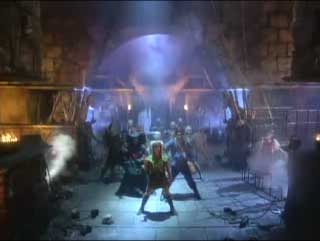
Well some people, like me, will remember there old SNES system and those games with that FX label on the front.

Quick Selection of most of the games created with the SuperFX chip.
The SuperFX chip was actually an offloading 3d renderer for the Super Nintendo, kindof a cool thing. However today we are talking about overclocking this bad boy. :)
As the link in the digg post states the speed of the clock for the SuperFX chip was 21.4 MHz, the plan is to remove it and replace it with a slightly faster 24MHz ossilator. The funny thing about this is that the FX chip is an addon internal to the cartridges which are labeled
 , so each game can be clocked differently and will require it's own new ossilator.
You may be thinking this won't work, how can you be sure the other components have data in the pipe wating to be worked on when the clock changes. You don't this is just trial and error fun. However the poster did manage his feet and the game performed "better" whether this is a placebo affect or not it is still cool that the game functioned with the even minimal overclocking.
Thursday, November 17, 2005
Probability BS
Take a look at that homework.
Here is the abridged version.
1. Stick a fork in your eye.
2-4. Twist the fork.
5. Stick a fork in your other eye
6-7. Twist that second fork.
8. Twist both forks.
9. Cut off one hand.
10. Now the other.
This has been the abridged works of PEA HW10.
Numa Numa
Can't get enough of that Numa Dance?
Now you can Numa in Hebrew.
If you find anymore Numa Dances please leave a link in my comments. I must be insane.
Now you can Numa in Hebrew.
If you find anymore Numa Dances please leave a link in my comments. I must be insane.
Subscribe to:
Posts (Atom)